
SynaBun Documentation
106 MCP tools for AI assistants — persistent memory, AI image & video generation, browser automation, social media tools, visual workspace, Automation Studio, and dedicated sidepanels for Claude Code, Codex, and OpenCode. One server, every AI editor.
Overview #
SynaBun is a persistent vector memory system for AI assistants. Any MCP-compatible AI tool — Claude Code, Codex, Gemini, OpenCode, Cursor, Windsurf, or any other — can connect and retain knowledge across sessions through semantic vector search. Dedicated sidepanels ship for Claude Code, Codex, and OpenCode with tool activity docks, per-agent abort, permission cards, TODO drawer, context gauge, and Multi-CLI Resume with provider picker.
Memories are stored in SQLite as vector embeddings, with rich metadata for payload-based filtering. When your AI needs to recall something, it searches by semantic meaning rather than exact keywords — so it finds the relevant memory even if you phrase things differently than when you originally stored it.
Key Capabilities #
- 106 MCP tools — memory (8), profile (1), browser automation (40 incl.
browser_cheatsheet), leonardo AI (5), Google Search Console (30), whiteboard (5), cards (5), discord (8), git (1), loop (1), tictactoe (1), image (1) - 100+ REST API endpoints — full HTTP API for external integrations and the Neural Interface
- 3 dedicated sidepanels — Claude Code, Codex, and OpenCode with tool activity docks, per-agent abort, permission cards, TODO drawer, context gauge, session menu, new-session modal (project + branch picker), and Multi-CLI Resume with provider picker
- Automation Studio — user-created collapsible folders, per-template launch defaults (CLI / Model / Effort / MCP profile), first-class 4-CLI support (Claude Code, Codex, Gemini, OpenCode)
- Universal MCP Management — smart-paste add form (auto-detects 5 config formats), multi-platform sync across Claude Code / Codex / Gemini / OpenCode, centralized env vault with sensitive-value masking, auto profile registration, and one-click install from GitHub
- Recall Profile Presets — Quick / Balanced / Deep / Custom with 6 fine-tune controls and a live impact indicator (tokens/recall, memories reachable, session context)
- 7 Claude Code hooks — lifecycle hooks for automated memory capture, user learning (5 binding directives), and context management (SessionStart, UserPromptSubmit, PreCompact, Stop, PreToolUse, PostToolUse x2)
- Local embeddings by default — Transformers.js (all-MiniLM-L6-v2, 384 dimensions) with zero configuration, plus 12+ optional cloud providers
- 3D Neural Interface — force-directed graph visualization of your memory at
localhost:3344 - Multi-project support — memories are tagged by project, searchable across all or filtered per-project
- Hierarchical categories — parent/child category system with dynamic schema
- Modern code rendering — syntax highlighting, file path linkification, language labels, hover-only copy buttons, 30 fps throttled streaming, real-time thinking-block streaming
- Self-hosted, local-first — your data never leaves your infrastructure
/synabun changelog quick action). It also works with Cursor, Windsurf, Continue, Claude.ai, and any other tool that supports the Model Context Protocol.How It Works #
When your AI assistant calls remember, SynaBun converts the content into a vector embedding using your configured embedding provider, then stores it in SQLite with metadata (category, project, importance, tags, related files). When it calls recall, SynaBun embeds the query and performs approximate nearest-neighbor search, returning the most semantically similar memories ranked by a composite score.
The composite scoring algorithm weights vector similarity, recency, importance, and payload filter matches to surface the most relevant memories — not just the most similar ones.
Quick Start #
Prerequisites #
- Node.js 22.5+ — for the MCP server, SQLite database (via built-in
node:sqlite), and Neural Interface - No API keys required — local embeddings via Transformers.js work out of the box, or optionally configure a cloud provider
Installation #
# Clone the repository
git clone --depth=1 https://github.com/danilokhury/Synabun.git
cd Synabun

# Start everything (installs deps, builds MCP, launches Neural Interface)
npm start
# Install globally via npm
npm install -g synabun

# Launch (installs deps, builds MCP, opens onboarding wizard)
synabun
What npm start does #
- Creates the SQLite database at
data/memory.dbwith the correct schema and vector dimensions for your embedding model - Downloads the local embedding model (Xenova/all-MiniLM-L6-v2, ~23MB ONNX) on first run
- Starts the MCP server (stdio and HTTP transports, compatible with all MCP clients)
- Starts the Neural Interface REST API on port
3344 - Opens the 3D Neural Interface in your browser
Connect to Claude Code #
Add SynaBun to your Claude Code MCP configuration:
// ~/.claude/.mcp.json
{
  "mcpServers": {
    "SynaBun": {
      "command": "node",
      "args": ["/path/to/synabun/mcp-server/index.js"],
      "env": {}
    }
  }
}
npm run setup) automatically generates the correct .mcp.json configuration for your installation path and selected embedding provider.Verify Installation #
# Check database exists
ls data/memory.db

# Check Neural Interface API
curl http://localhost:3344/api/memories?limit=5

# Open Neural Interface in browser
open http://localhost:3344
Architecture #
SynaBun follows a layered architecture: your AI assistant communicates via MCP, the MCP server handles tool dispatch, embeddings are generated via your chosen provider, and vectors are stored and searched in SQLite.
┌─────────────────────────────────────────────────────────────┐
│                     AI ASSISTANT                             │
│         (Claude Code, Cursor, Windsurf, etc.)               │
└───────────────────────┬─────────────────────────────────────┘
                        │  Model Context Protocol (stdio or HTTP)
                        ▼
┌─────────────────────────────────────────────────────────────┐
│                  SYNABUN MCP SERVER                         │
│                                                             │
│  ┌──────────┐  ┌──────────┐  ┌──────────┐  ┌──────────┐   │
│  │ remember │  │  recall  │  │ reflect  │  │  forget  │   │
│  └──────────┘  └──────────┘  └──────────┘  └──────────┘   │
│  ┌──────────┐  ┌──────────┐  ┌──────────┐  ┌──────────┐   │
│  │ restore  │  │ memories │  │   sync   │  │ category │   │
│  └──────────┘  └──────────┘  └──────────┘  └──────────┘   │
└─────────────┬───────────────────────┬───────────────────────┘
              │                       │
              ▼                       ▼
┌─────────────────────┐  ┌───────────────────────────────────┐
│  EMBEDDING PROVIDER │  │         SQLITE (data/memory.db)   │
│                     │  │                                   │
│  • Transformers.js  │  │  Table: memories                  │
│  • Ollama (local)   │  │  Vectors: float32[]               │
│  • Google Gemini    │  │  Payload: category, project,      │
│  • Cohere           │  │    importance, tags, files,       │
│  • 12+ providers    │  │    timestamps, source             │
└─────────────────────┘  └───────────────────────────────────┘
                                        │
                                        ▼
                        ┌───────────────────────────────────┐
                        │    NEURAL INTERFACE               │
                        │    (Express REST API + 3D UI)     │
                        │    localhost:3344                 │
                        └───────────────────────────────────┘
Data Flow #
Writing a memory: AI calls remember(content, category, importance) → MCP server generates embedding via provider → stores vector + payload in SQLite → returns UUID.
Reading memories: AI calls recall(query) → MCP server embeds the query → SQLite performs ANN search → results filtered and re-ranked by composite score (similarity + recency + importance) → top N memories returned.
Neural Interface: Browser connects to the Express REST API on port 3344 → fetches memories as nodes → renders 3D force-directed graph with Three.js → allows search, trash, restore, backup, and sync operations.
Composite Scoring #
The recall ranking algorithm combines multiple signals into a final score:
// Simplified scoring formula
const score =
  vector_similarity * 0.60    // semantic closeness (primary signal)
  + recency_score  * 0.20    // newer memories ranked higher
  + importance     * 0.15    // user-set importance 1–10
  + project_boost  * 0.05;   // current project match bonus
MCP Tools #
SynaBun exposes 106 tools via the Model Context Protocol. The memory tools below are the core of the system. Profile, browser, whiteboard, card, discord, leonardo AI, git, loop, tictactoe, and image tools are documented in their respective sections.
| Tool | Purpose | Key Parameters |
|---|---|---|
remember | Store a new memory | content, category, importance, tags, project, source, related_files |
recall | Semantic search | query, category, project, limit, min_score, min_importance, tags |
reflect | Update an existing memory | memory_id, content, category, importance, tags, add_tags, related_files, related_memory_ids |
forget | Soft-delete (move to trash) | memory_id |
restore | Restore from trash | memory_id |
memories | Browse recent or get stats | action (recent/stats/by-category/by-project), limit, category, project |
sync | Detect stale memories | project |
category | Manage categories | action (create/update/delete/list), name, description, parent, color |
profile | Switch tool profiles at runtime — enable or disable whole tool groups without restarting | action (get/set), name (preset), groups (custom list) |
image_staged | Manage staged images — list, remove, or clear the upload queue | action (list/remove/clear), id |
browser_cheatsheet | Curated selector cheatsheet with stable locators and match context for common platforms (Twitter/X, LinkedIn, Instagram, TikTok, Facebook, WhatsApp, generic web) | site, category |
leonardo_browser_reference | Attach a reference image (style / character / content) to the next Leonardo.ai generation via the browser UI | filepath, mode |
tictactoe | Play tic-tac-toe | action (start/move/state/end) |
remember #
Store a memory with content, category, importance, and optional metadata. Returns the full UUID of the created memory.
// Store a bug fix
remember({
  content: "Fixed race condition in auth middleware by adding mutex lock around token refresh logic. Root cause was concurrent requests hitting the token expiry check simultaneously.",
  category: "bug-fixes",
  importance: 8,
  tags: ["auth", "race-condition", "middleware"],
  project: "my-app",
  source: "self-discovered",
  related_files: ["src/middleware/auth.ts"]
})
The source field accepts: user-told, self-discovered, auto-saved. Importance ranges from 1 (trivial) to 10 (foundational).
recall #
Semantic search across all stored memories. Uses vector similarity to find relevant memories even if exact words don't match.
// Search with filters
recall({
  query: "authentication issues token refresh",
  category: "bug-fixes",
  project: "my-app",
  limit: 5,
  min_score: 0.3,
  min_importance: 5,
  tags: ["auth"]
})
All filter parameters are optional. Omitting category and project searches across everything, with a score boost for the current project.
reflect #
Update an existing memory. Provide only the fields you want to change. If content is updated, the embedding vector is regenerated automatically.
// Update importance and add a tag
reflect({
  memory_id: "8f7cab3b-644e-4cea-8662-de0ca695bdf2",
  importance: 9,
  add_tags: ["critical"],
  subcategory: "auth"
})
memory_id parameter requires the full UUID format (e.g. 8f7cab3b-644e-4cea-8662-de0ca695bdf2). Shortened IDs are not accepted. Use recall to get the full UUID first.forget / restore #
forget moves a memory to trash (soft delete). restore brings it back. Trashed memories can also be managed from the Neural Interface trash panel.
// Soft-delete
forget({ memory_id: "8f7cab3b-644e-4cea-8662-de0ca695bdf2" })

// Restore from trash
restore({ memory_id: "8f7cab3b-644e-4cea-8662-de0ca695bdf2" })
memories #
Browse memories or get statistics. Useful at session start to get recent context.
// Get recent memories
memories({ action: "recent", limit: 10 })

// Get stats
memories({ action: "stats" })

// Browse by category
memories({ action: "by-category", category: "bug-fixes" })

// Browse by project
memories({ action: "by-project", project: "my-app", limit: 20 })
sync #
Detects memories whose related_files have changed since the memory was last updated. Compares file content hashes against stored checksums. Returns a list of potentially stale memories.
// Check all memories for staleness
sync({})

// Check only a specific project
sync({ project: "my-app" })
category_create / category_update / category_delete / category_list #
Manage the category taxonomy. Categories can have parent/child relationships. Creating or updating a category triggers a dynamic schema refresh so the recall tool's category descriptions update immediately.
// Create a parent category
category_create({
  name: "myproject",
  description: "All knowledge for My Project",
  is_parent: true,
  color: "#3b82f6"
})

// Create a child category
category_create({
  name: "myproject-bugs",
  description: "Bug fixes and known issues",
  parent: "myproject"
})

// Rename a category
category_update({ name: "myproject-bugs", new_name: "myproject-issues" })

// Delete, reassigning memories to another category
category_delete({ name: "myproject-issues", reassign_to: "myproject" })

// List all categories as a tree
category_list({ format: "tree" })
Whiteboard Tools #
SynaBun includes a shared visual canvas that your AI can see, draw on, and use for architecture diagrams, planning, and collaborative sketching. 5 MCP tools control the whiteboard.
| Tool | Purpose | Key Parameters |
|---|---|---|
whiteboard_read | Read current whiteboard state | (none) — returns all elements with IDs, positions, and properties |
whiteboard_add | Add elements to the canvas | elements (array), layout (row/column/grid/center), coordMode (px/pct) |
whiteboard_update | Update element properties | id, updates (position, size, content, color, rotation), coordMode |
whiteboard_remove | Remove elements or clear canvas | id (omit to clear all) |
whiteboard_screenshot | Capture whiteboard as JPEG | (none) |
Element Types #
- text — Text boxes with configurable font size and color
- list — Bulleted or numbered lists
- shape — Rectangles, circles, pills, and drawn circles
- arrow — Connectors with auto-anchor snapping to element centers
- pen — Free-form drawing strokes with configurable width
- image — Images with automatic compression (max 1920×1920)
- section — Wireframe blocks (navbar, hero, sidebar, content, footer, card, form, modal, grid)
// Add a diagram with auto-layout
whiteboard_add({
  elements: [
    { type: "text", content: "Auth Flow", fontSize: 24 },
    { type: "shape", shape: "rect", content: "Login" },
    { type: "shape", shape: "rect", content: "Token" },
    { type: "arrow", from: "Login", to: "Token" }
  ],
  layout: "row"
})
whiteboard_read before placing elements — it returns the viewport dimensions so your AI can position elements correctly. Use coordMode: "pct" for responsive layouts.Card Tools #
Memory cards are floating panels in the Neural Interface that display memory content. Your AI can open, arrange, pin, and screenshot cards to build visual workspaces for research, investigations, or reference material.
| Tool | Purpose | Key Parameters |
|---|---|---|
card_list | List all open cards | (none) — returns UUID, position, size, compact/pinned state |
card_open | Open memory as floating card | memoryId, left, top, coordMode (px/pct), compact |
card_close | Close card(s) | memoryId (omit to close all) |
card_update | Move, resize, or pin cards | memoryId, updates (position, size, compact, pinned), coordMode |
card_screenshot | Capture card workspace | (none) — captures all open cards in current layout |
// Open a memory as a compact card
card_open({
  memoryId: "8f7cab3b-644e-4cea-8662-de0ca695bdf2",
  left: 50,
  top: 10,
  coordMode: "pct",
  compact: true
})
Discord Tools #
8 MCP tools for full Discord server management. Requires a DISCORD_BOT_TOKEN in your .env file. Set DISCORD_GUILD_ID for a default server.
| Tool | Purpose | Key Actions |
|---|---|---|
discord_guild | Server info & overview | info, channels, members, roles, audit_log |
discord_channel | Channel management | create, edit, delete, list, permissions |
discord_role | Role management | create, edit, delete, list, assign, remove |
discord_message | Send & manage messages | send, edit, delete, pin, unpin, react, bulk_delete, list |
discord_member | Member moderation | info, kick, ban, unban, timeout, nickname |
discord_onboarding | Server setup | get, set_welcome, set_rules, set_verification, set_onboarding |
discord_webhook | Webhook management | create, edit, delete, list, execute |
discord_thread | Thread management | create, archive, unarchive, lock, delete |
// Send a message
discord_message({
  action: "send",
  channel: "general",
  content: "Deployment complete! v2.1.0 is live."
})

// Create a role
discord_role({
  action: "create",
  name: "Beta Tester",
  color: "#3b82f6",
  mentionable: true
})
action parameter to select the operation. Channel types include: text, voice, category, announcement, forum, and stage.Autonomous Loops #
The loop tool enables autonomous iteration — your AI can run long-running tasks with up to 200 iterations and configurable time caps (up to 480 minutes). Progress is tracked via a journal across context compactions.
| Action | Purpose | Key Parameters |
|---|---|---|
start | Begin a new loop | task, iterations (max 200), max_minutes (max 480), context, template |
stop | Force stop active loop | session_id |
status | Check loop state | session_id |
update | Update progress journal | session_id, summary, progress |
// Start a monitoring loop
loop({
  action: "start",
  task: "Check the deploy status every iteration and report any failures",
  iterations: 20,
  max_minutes: 120
})
Git Tool #
The git MCP tool provides version control operations directly through the MCP protocol — status, diff, commit, log, and branch management.
| Action | Purpose | Key Parameters |
|---|---|---|
status | Working tree status | path (repo absolute path) |
diff | Show file changes | path, max_lines (default 500) |
commit | Stage and commit | path, message, files (array) |
log | Recent commit history | path, count (default 10) |
branches | List all branches | path |
// Check repo status
git({
  action: "status",
  path: "/Users/me/my-project"
})

// Commit specific files
git({
  action: "commit",
  path: "/Users/me/my-project",
  message: "Fix auth middleware race condition",
  files: ["src/middleware/auth.ts"]
})
Neural Interface #
The Neural Interface is a 3D force-directed graph visualization of your memory at localhost:3344. Each memory is a node, related memories are connected by edges, and categories form visual clusters.
Core Features #
- 3D force-directed graph — powered by Three.js with Unreal Bloom post-processing. Sun nodes for parent categories, planet nodes for children, star nodes for memories. Full camera controls (WASD + QE movement, mouse rotation/pan) with compass HUD.
- 2D alternative — Pixi.js-based 2D view with minimap navigation and force-directed layout for performance-focused workflows.
- Live search — search across all memories in real-time with filters (category, project, importance, tags). Matching nodes highlight and camera animates to them.
- Memory inspector — click any node to see full content, metadata, related files, and tags in a detail panel.
- Trash panel — browse, restore, or permanently delete trashed memories without leaving the browser.
- Sync panel — run the staleness check and see which memories reference files that have changed.
- Backup & restore — export all memories as a JSON snapshot, import from a snapshot to a new SQLite instance.
- Category logos — projects can have custom logos displayed as node decorations.
IDE Features #
- Sidepanels for Claude Code, Codex, and OpenCode — three dedicated chat panels with per-agent abort, tool activity dock, permission cards, TODO drawer, context gauge (with 1M context activation), session menu, new-session modal (project + branch picker), and Multi-CLI Resume. See Sidepanels.
- Skills Studio — browse, create, edit, import/export skills and agents. Multi-file support, icon upload, validation, and install/uninstall management.
/synabunand/leonardorun on both Claude Code and Codex;/synabun changelogis a quick-action button inside the OpenCode sidepanel. - Automation Studio — visual template editor for loops and agents with user-created collapsible folders (drag/drop, icons, colors), per-template launch defaults (CLI / Model / Thinking effort / MCP profile), and first-class 4-CLI support (Claude Code, Codex, Gemini, OpenCode). See Automation Studio.
- MCP Management — Universal Add Form with smart paste (auto-detects 5 config formats), multi-platform sync across the 4 CLIs, centralized env vault with sensitive-value masking, auto profile registration, and one-click install from GitHub. See MCP Management.
- Multi-tab terminal — PTY-backed terminal on a single xterm.js surface with ANSI color support (256-color + truecolor), git branch tracking, command history, session lock, split view, Windows ConPTY hints, and unified CLI update commands via
npm install -gfor all 4 CLIs. - File explorer — project file tree with custom folder colors, sort options, and collapsible sections.
- Whiteboard canvas — shared drawing surface for AI and human collaboration. Free-form pen, text, shapes, arrows, images, and wireframe sections with undo/redo (50-level stack).
- Floating memory cards — open memories as draggable, pinnable cards. Compact mode (220×120px mini-cards), persistent positioning, and workspace screenshots.
- Cost widget — Claude API cost tracking with per-session breakdowns and model cost awareness. Collapsible and dockable.
- Statistics dashboard — memory count by category/project, importance distribution, age distribution, and health checks (stale memories, orphaned categories).
Customization #
- Custom skins — upload custom CSS themes for the entire interface.
- Keybinds — 20+ bindable actions (toggle panels, launch tools, navigation, search). Import/export keybind configurations.
- Workspaces — save and restore panel layouts, sidebar state, and terminal positions. Layout presets per variant (2D/3D).
- Custom file icons — per-extension or per-filename icons with PNG/SVG support.
- Guest access — generate 24-hour invite links with feature-level permission control. Cloudflare tunnel proxy support for remote access.
REST API #
The Neural Interface runs an Express server with 100+ REST endpoints. All MCP tool operations are also available via HTTP for external integrations:
# Get all memories
GET http://localhost:3344/api/memories

# Search memories
POST http://localhost:3344/api/memories/search
{ "query": "auth bug", "limit": 5 }

# Get a specific memory
GET http://localhost:3344/api/memories/:id

# Create a memory
POST http://localhost:3344/api/memories
{ "content": "...", "category": "...", "importance": 5 }

# Update a memory
PATCH http://localhost:3344/api/memories/:id

# Delete (trash) a memory
DELETE http://localhost:3344/api/memories/:id

# List categories
GET http://localhost:3344/api/categories

# Get graph data for visualization
GET http://localhost:3344/api/graph

# Stats
GET http://localhost:3344/api/stats
Sidepanels (Claude, Codex, OpenCode) #
SynaBun ships three dedicated chat sidepanels that dock to the side of your editor and talk to the same memory backend. They share a common visual language and feature set while exposing each CLI's native capabilities.
Feature Matrix #
| Feature | Claude | Codex | OpenCode |
|---|---|---|---|
Tool Activity Dock (Ctrl/Cmd+Shift+A) | — | — | ✅ |
| TODO Widget slide-out drawer | ✅ | — | — |
| Agents Drawer with per-agent abort + inline step expansion | ✅ | — | ✅ |
| Permission cards with tool-specific context (bash / edit / write / read / webfetch) | ✅ | ✅ | ✅ |
| Plan mode with AskUserQuestion and post-plan action card | ✅ | ✅ | ✅ |
| Session menu, new-session modal (project + branch picker) | ✅ | ✅ | ✅ |
| Multi-CLI Resume with provider picker (FTS5 + semantic search) | ✅ | ✅ | ✅ |
| Context gauge with 1M context activation | ✅ | ✅ | ✅ |
| Collapsible tool cards with lazy body flush | ✅ | ✅ | ✅ |
| Streamed thinking blocks + 30 fps throttled rendering | ✅ | ✅ | ✅ |
| Syntax highlighting + file path linkification + language labels + copy button | ✅ | ✅ | ✅ |
/synabun + /leonardo multi-runtime skills | ✅ | ✅ | ✅ |
/synabun changelog quick skill button | — | — | ✅ |
| Tray pills for minimized sessions | — | — | ✅ |
Floating terminal with Escape key forwarding | ✅ | ✅ | ✅ |
Code Rendering #
- Syntax highlighting for fenced code blocks.
- File path linkification —
path/to/file.ts:42becomes a clickable link that jumps to the file explorer. - Language labels shown in the code header, plus a hover-only copy button.
- Throttled streaming at 30 fps to keep long-token streams smooth without thrashing the DOM.
- Real-time thinking blocks rendered progressively as the model streams reasoning (for the CLIs that emit it).
Keyboard Shortcuts #
Esc— abort the current turn (works panel-wide, not only when the input has focus).Ctrl/Cmd+Shift+A— toggle the OpenCode Tool Activity Dock.Enter— submit from the new-session modal;Escskips.
Automation Studio #
A visual template editor for autonomous loops and agents. Build once, launch across CLIs.
Collapsible Folders #
- Organize custom templates into user-created folders; presets stay in hard-coded categories (Social / Productivity / Monitoring).
- Drag templates onto a folder header to move them; drag folder headers to reorder.
- Per-folder icon (13-icon set + social platform icons), color (8-swatch palette), name, and collapsed state.
- Right-click menus on templates (Move to folder ▸ / Delete) and folder headers (Rename/Recolor, Collapse/Expand, Delete).
- Collapsed state persists per device in
localStorage; the servercollapsedflag is the first-run default. - Full backup/restore coverage via
data/loop-folders.json; export/import bumps toversion: 2with an explicit folders array.
Per-Template Launch Defaults #
- Save CLI (Claude Code, Codex, Gemini, OpenCode), Model, Thinking effort (Claude only), and MCP profile (Codex / Gemini / OpenCode) per template.
- The Launch Configuration modal opens pre-filled with the template's saved choices and still lets the user override before kicking off the loop.
- Runtime Card uses native
<select>elements so long MCP profile names (e.g. "memory-full — 40 tools") don't truncate. - Legacy templates without the fields render sensible defaults (Claude Code / default model / effort off / MCP "full").
4-CLI Support #
- Loop mode runs on all four CLIs.
cat <taskfile> | opencode run --model <m>is the non-interactive equivalent ofcodex execfor OpenCode. - Agent mode is Claude-exclusive (deep subagent integration). Agent mode is automatically disabled and the UI force-reverts to loop mode when a non-Claude CLI is selected.
- Think / effort chips hide for OpenCode (no reasoning flag in
opencode run). MCP Profile section auto-shows for non-Claude CLIs.
MCP Management #
One screen to install, configure, and sync every MCP server you use — across every CLI.
Universal Add Form (Smart Paste) #
- Auto-detects 5 config formats: stdio JSON, HTTP URL, OpenCode TOML, Claude
mcp addcommand, and plain JSON. - Tag-style arg chips, env var rows, and platform checkboxes with auto-detection.
- Sensitive values (tokens, API keys) are masked in the form and stored through the env vault.
Multi-Platform Sync #
A single MCP server entry syncs to Claude Code, Codex, Gemini, and OpenCode with one click. REST endpoints:
# List platforms SynaBun can sync to
GET http://localhost:3344/api/mcp/platforms

# Sync the selected server to every targeted platform
POST http://localhost:3344/api/mcp/sync
{ "serverId": "...", "platforms": ["claude-code", "codex", "gemini", "opencode"] }

# Remove the sync (per platform)
DELETE http://localhost:3344/api/mcp/sync?serverId=...&platform=codex
Env Vault & Auto Profile Registration #
- Secrets are stored once in the centralized env vault and referenced by name across MCP servers.
- Sensitive variables are masked in the add form and in settings screens.
- Newly added servers are auto-registered with profiles so they can be toggled by group via the
profileMCP tool. - Streamlined install from GitHub — paste a repo URL, SynaBun clones, builds, and registers the server.
- The
data/mcp/folder scaffold gives user-installed servers a predictable layout.
Recall Profile Presets #
Control how much context flows into each recall call. Configure from Settings > Memory in the Neural Interface.
4 Presets #
| Preset | Shape | When to use |
|---|---|---|
| Quick | Fewer results, high similarity floor, no session chunks | Fast lookups during code completion or quick questions. |
| Balanced | Default weighting across similarity, recency, and importance | Everyday coding; the default. |
| Deep | Broad result set, lower similarity floor, session chunks included | Architecture decisions, audits, cross-session recall. |
| Custom | User-defined via the 6 fine-tune sliders/toggles | Power users who want exact control. |
6 Fine-Tune Controls #
- Number of results — default limit per
recall. - Similarity threshold — minimum cosine-similarity score.
- Tag filter intensity — how aggressively tag matches re-rank results.
- Session chunk inclusion — include conversation transcript chunks.
- Importance floor — filter out memories below a minimum importance.
- Temporal bias — shift weighting toward recency vs. semantic similarity.
Impact Indicator #
The settings panel shows a live estimate of tokens per recall, memories reachable, and session context size so you can budget context windows intentionally. The /api/recall-impact endpoint powers the calculation (using avg_tags_len, avg_files_len, and per-project session stats).
Server-Side Defaults #
Configure the baseline recall shape globally via getRecallDefaults(). Every CLI follows the server-side defaults unless the tool call explicitly overrides them.
Claude Code Hooks #
SynaBun ships 7 lifecycle hooks for Claude Code that automate memory operations. Install them to get automatic context recall at session start and enforced memory capture after task completion.
| File | Event | Timeout | Purpose |
|---|---|---|---|
session-start.mjs | SessionStart | 5s | Injects category tree, project detection, 5 binding directives (incl. user learning), and compaction recovery |
prompt-submit.mjs | UserPromptSubmit | 3s | Multi-tier recall trigger system (7 priorities) — nudges AI to check memory and reflect on user patterns |
pre-compact.mjs | PreCompact | 10s | Captures session transcript before context compaction for conversation indexing |
stop.mjs | Stop | 3s | Enforces memory storage — blocks response if session isn't indexed or edits aren't remembered |
post-remember.mjs | PostToolUse | 3s | Tracks edit count and clears enforcement flags when memories are stored |
pre-websearch.mjs | PreToolUse | 2s | Blocks WebSearch/WebFetch during active browser sessions to prevent interference |
post-plan.mjs | PostToolUse | 3s | Auto-stores plans as memories when exiting plan mode |
Installing Hooks #
# Copy hooks to your Claude Code hooks directory
cp synabun/hooks/claude-code/*.mjs ~/.claude/hooks/

# Or configure via settings.json (recommended)
# See the Installation JSON section in the hooks documentation
SessionStart hook #
Runs when Claude Code starts a new session. Injects the full category tree, project detection rules, 5 binding directives (session start recall, auto-remember, recall before decisions, compaction auto-store, user learning), and compaction recovery context. This is prepended to the session before the user types anything.
UserPromptSubmit hook #
Intercepts each user message before it reaches Claude. Analyzes the prompt against a 7-priority trigger system (recall tiers, non-English detection, Latin catch-all, user learning reflection) and injects context-aware nudges. Priority 7 is a quiet-only user learning nudge that fires after a configurable number of interactions.
PreCompact hook #
Fires before context compaction occurs. Captures the session transcript path and metadata, sets a pending-compact flag that the Stop hook will enforce — ensuring the compacted session gets indexed in memory before Claude can proceed.
Stop hook #
Runs after Claude completes a response. Enforces two requirements: (1) if a pending-compact flag exists, blocks Claude until the session is indexed via remember with category "conversations", and (2) if a pending-remember flag exists with 3+ unremembered edits, blocks until work is stored. Max 3 retries per flag to prevent infinite loops.
PostToolUse hook (post-remember) #
Matches Edit, Write, NotebookEdit, and mcp__SynaBun__remember tool calls. Tracks edit count (incrementing a pending-remember counter) and clears enforcement flags when memories are stored — conversations category clears the compact flag, other categories reset the remember counter.
PreToolUse hook (pre-websearch) #
Intercepts WebSearch and WebFetch tool calls. Checks if a SynaBun browser session is active or if the current loop uses the browser — if so, blocks the tool and injects a message telling Claude to use the SynaBun browser tools instead. Falls through gracefully if the Neural Interface is unreachable.
PostToolUse hook (post-plan) #
Fires when Claude exits plan mode via ExitPlanMode. Automatically stores the finalized plan as a memory in the appropriate plans category, ensuring architectural decisions and implementation strategies are captured without manual intervention.
conversationMemory (compaction auto-store), greeting (session greeting), userLearning (autonomous user observation), and userLearningThreshold (interaction count before reflection nudge).Claude Code Integration #
SynaBun ships a single slash command — /synabun — that serves as the entry point for all memory-powered capabilities. It runs on both Claude Code and Codex, and the OpenCode sidepanel exposes a dedicated /synabun changelog quick-action button. Type it in your CLI and an interactive menu appears:
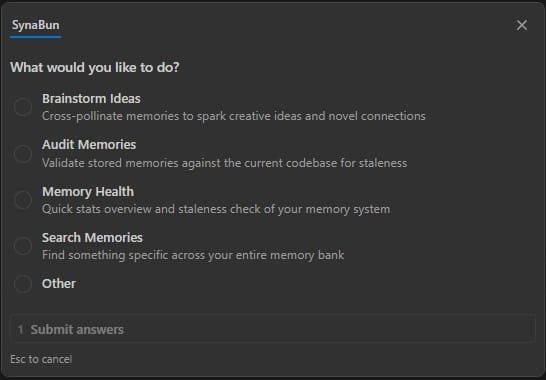
/synabun — Command Hub #
The /synabun command presents an interactive prompt with these options:
| Option | What it does |
|---|---|
| Brainstorm Ideas | Cross-pollinate memories to spark creative ideas and novel connections. Uses multi-round recall with 5 query strategies (direct, adjacent, problem-space, solution-space, cross-domain) and synthesizes ideas traced back to specific memories. |
| Audit Memories | Validate stored memories against the current codebase for staleness. Runs 6 phases: landscape survey, checksum pre-scan, bulk retrieval, parallel semantic verification, interactive classification (STALE/INVALID/VALID/UNVERIFIABLE), and audit report. |
| Memory Health | Quick stats overview and staleness check of your memory system — total count, category distribution, stale file references. |
| Search Memories | Find something specific across your entire memory bank using semantic search. |
| Changelog | Show the SynaBun release history and newest user-facing features. Available as a dedicated quick-action button inside the OpenCode sidepanel (/synabun changelog). |
/synabun
/synabun is the only slash command you need to remember. All capabilities — brainstorming, auditing, health checks, search, and changelog — are accessible from the interactive menu it displays. Both /synabun and /leonardo support multi-runtime use across Claude Code and Codex.Category System #
Categories are the primary organizational axis in SynaBun. Each memory belongs to exactly one category. Categories support a parent/child hierarchy, custom colors, and descriptions that appear in the recall tool's schema hints.
Hierarchy #
Categories can have a parent, forming a tree structure. Parent categories act as top-level organizational branches. Child categories provide fine-grained routing within a branch. When routing a memory, use the most specific applicable category.
myproject (parent)
├── myproject-bugs        # Bug fixes and known issues
├── myproject-arch        # Architecture decisions
├── myproject-api         # API design notes
└── myproject-deploy      # Deployment and infrastructure
Routing Descriptions #
The description field of each category is surfaced in the MCP tool schema as a hint to AI assistants. A good description should explain what belongs here in routing language:
Good: "Bug fixes, known issues, and error resolutions for My Project"
Good: "Architecture decisions, system design patterns, and rationale"

Bad: "Bugs"
Bad: "My stuff"
Dynamic Schema Refresh #
When you create, rename, or update a category, SynaBun automatically refreshes the MCP tool schema. The next time Claude Code requests the tool manifest, it will see the updated category descriptions — no server restart required.
Built-in Categories #
| Category | Purpose |
|---|---|
conversations | Indexed conversation sessions for cross-session recall |
synabun | Knowledge about SynaBun itself (parent) |
synabun/architecture | System architecture and data flow |
synabun/mcp-tools | Tool behavior, quirks, usage patterns |
synabun/hooks | Claude Code hook configuration |
synabun/setup | Installation and onboarding |
user-profile | Knowledge about the user as a person (parent) |
user-profile/communication-style | Tone, formality, verbosity, language patterns, text quirks |
Embedding Providers #
SynaBun supports 12+ embedding providers. The provider is configured once in .env and used for all new memories. You can switch providers, but existing memories embedded with a different model will not be comparable — a re-index is required.
all-MiniLM-L6-v2 by default for completely offline, local-only embeddings. No API key required. The ~23MB ONNX model downloads once and runs entirely in Node.js — your data never leaves the machine.| Provider | Base URL | Recommended Model | Notes |
|---|---|---|---|
transformers | local (in-process) | all-MiniLM-L6-v2 | Default. 384 dimensions, fully local, no API key. |
openai | api.openai.com | text-embedding-3-small | Best quality / cost ratio. Requires API key. |
ollama | localhost:11434 | nomic-embed-text | Fully local. No API key. |
gemini | generativelanguage.googleapis.com | text-embedding-004 | Google Gemini embeddings |
cohere | api.cohere.ai | embed-english-v3.0 | Strong multilingual support |
mistral | api.mistral.ai | mistral-embed | European data residency |
voyage | api.voyageai.com | voyage-3 | High quality for code |
nomic | api-atlas.nomic.ai | nomic-embed-text-v1.5 | Open source model |
jina | api.jina.ai | jina-embeddings-v3 | Long context support |
together | api.together.xyz | togethercomputer/m2-bert-80M-8k-retrieval | Serverless inference |
fireworks | api.fireworks.ai | nomic-ai/nomic-embed-text-v1.5 | Fast inference |
azure | your-resource.openai.azure.com | text-embedding-3-small | Azure OpenAI endpoint |
bedrock | via AWS SDK | amazon.titan-embed-text-v2:0 | AWS managed, IAM auth |
Configuration #
SynaBun uses a namespaced .env format. Each SQLite instance and each embedding provider gets a unique <id> prefix. This allows multi-instance setups with different providers per instance.
SQLite Configuration #
# Database file path (default: data/memory.db)
SQLITE_DB_PATH=data/memory.db

# SQLite runs embedded in Node.js via node:sqlite
# No port, no API key, no external process needed
Embedding Provider Configuration #
# Format: EMBEDDING__<id>__<SETTING>
# Select active embedding provider
# Default: local Transformers.js (no config needed)
# EMBEDDING_ACTIVE=transformers

# Optional: OpenAI (requires API key)
# EMBEDDING_ACTIVE=openai_main
# EMBEDDING__openai_main__API_KEY=sk-your-api-key-here
# EMBEDDING__openai_main__BASE_URL=https://api.openai.com/v1
# EMBEDDING__openai_main__MODEL=text-embedding-3-small
# EMBEDDING__openai_main__DIMENSIONS=1536
# EMBEDDING__openai_main__LABEL=OpenAI Main

# Ollama (local, no API key needed)
# EMBEDDING__ollama__BASE_URL=http://localhost:11434
# EMBEDDING__ollama__MODEL=nomic-embed-text
# EMBEDDING__ollama__DIMENSIONS=768
# EMBEDDING__ollama__LABEL=Ollama Local
Server Configuration #
# Neural Interface server port (default: 3344)
# NEURAL_PORT=3344

# Setup wizard completion flag
# SETUP_COMPLETE=false
DIMENSIONS value must match the output dimension of your chosen model. Mismatches will cause SQLite collection creation to fail. Check the model card for the correct value.Browser Automation #
SynaBun integrates Playwright to give your AI assistant its own Chromium browser with persistent sessions. Your AI can navigate websites, interact with elements, fill forms, take screenshots, execute JavaScript, and extract structured data — all through natural language commands via MCP.
How It Works #
Each browser session runs a real Chromium instance managed by Playwright. Sessions maintain their own cookies, login state, and local storage across AI conversations — your AI stays logged into platforms without re-authenticating each time. Sessions can run headed (visible window) or headless.
Browser Tools (19) #
- browser_navigate — Open any URL in the AI's browser
- browser_click — Click elements by CSS selector, text content, ARIA role, or data-testid. Supports selector auto-heal via
textHintso brittle locators self-repair when a site tweaks its DOM. - browser_fill — Clear and fill input fields and textareas
- browser_type — Type text character-by-character (for contenteditable elements like social media composers)
- browser_snapshot — Get the page's accessible structure as text (token-efficient alternative to screenshots). Supports multiple snapshot modes and viewport filtering to keep output small. When passed
returnSnapshot: true, action tools (click / fill / type) fold their post-action snapshot into the same response for one-round-trip workflows. - browser_screenshot — Capture the visible viewport as a base64 JPEG image
- browser_content — Extract page content as text (default) or markdown for LLM-optimized output with headings and links preserved
- browser_evaluate — Execute arbitrary JavaScript in the page context
- browser_hover — Hover over page elements
- browser_select — Select dropdown options
- browser_press — Press keyboard keys and shortcuts
- browser_wait — Wait for elements to appear, page load states, or timeouts
- browser_scroll — Scroll the page or specific elements
- browser_go_back — Navigate to the previous page
- browser_go_forward — Navigate to the next page
- browser_reload — Refresh the current page
- browser_upload — Upload files through form inputs
- browser_session — Create, list, or close browser sessions. Sessions are isolated between the CLI and the Neural Interface sidepanels/loops, so agents don't fight each other over the same Chromium instance.
- browser_cheatsheet NEW — Curated selector cheatsheet with stable selectors and match context for common platforms (Twitter/X, LinkedIn, Instagram, TikTok, Facebook, WhatsApp, and generic web). Accepts
siteandcategoryfilters.
browser_cheatsheet on demand instead.Social Media Automation #
Beyond the general browser tools, SynaBun includes 21 dedicated extraction tools for parsing social media content into structured JSON. These tools are faster and more reliable than using browser_snapshot because they use platform-specific DOM parsing.
Twitter / X #
- browser_extract_tweets — Parses all visible tweets: author, handle, text, timestamp, URL, replies, reposts, likes, and view counts. Works on timelines, search results, and profile pages.
TikTok #
- browser_extract_tiktok_videos — Extract feed videos with handle, video URL, caption, likes, comments, saves, shares, and music info
- browser_extract_tiktok_search — Parse search results with video URLs, handles, captions, and view counts
- browser_extract_tiktok_profile — Extract profile info: name, handle, bio, followers, following, likes, plus video grid with URLs and views
- browser_extract_tiktok_studio — Parse TikTok Studio content list: title, URL, date, privacy setting, and performance stats
Facebook #
- browser_extract_fb_posts — Parse visible posts: author, author URL, text, timestamp, post URL, and reactions. Works on news feeds, group feeds, and business Pages.
WhatsApp #
- browser_extract_wa_chats — Parse the WhatsApp Web sidebar: chat name, last message, time, unread count, muted/pinned status
- browser_extract_wa_messages — Extract messages from an open conversation: sender, time, date, direction (in/out), and text content
Instagram #
- browser_extract_ig_feed — Parse feed posts: username, caption, likes, comments, and timestamp
- browser_extract_ig_profile — Extract profile data: bio, follower/following stats, post grid, and story highlights
- browser_extract_ig_post — Single post with full comments (supports pagination)
- browser_extract_ig_reels — Extract reels with engagement metrics and audio name/URL
- browser_extract_ig_search — Parse explore and hashtag search results
LinkedIn #
- browser_extract_li_feed — Feed posts with author, headline, text, reactions, comments, and article links
- browser_extract_li_profile — Profile data: headline, location, connections, experience, education, and skills
- browser_extract_li_post — Single post with full comments (supports pagination)
- browser_extract_li_notifications — Notifications with text, timestamp, and read status
- browser_extract_li_messages — Messaging conversations and active thread messages
- browser_extract_li_search_people — People search results with headline and location
- browser_extract_li_network — Network connections and connection suggestions
- browser_extract_li_jobs — Job listings from search results and homepage recommendations (title, company, location, salary, posted date)
Other Platforms #
The general browser automation tools can interact with any web-based platform — YouTube, Reddit, Pinterest, or any site accessible in a Chromium browser. Use browser_navigate, browser_click, browser_type, and browser_content to automate interactions on any website.
Leonardo.ai Tools #
SynaBun includes 5 browser-based Leonardo.ai MCP tools for AI-powered image and video generation. These tools automate the Leonardo.ai web UI directly via Playwright — no API key needed. Use generic browser tools to configure settings (model, style, dimensions, motion controls), then use the Leonardo tools to generate and retrieve results.
Browser Tools (5) #
- leonardo_browser_navigate — Navigate to specific Leonardo.ai pages (home, library, image editor, video, upscaler, blueprints, realtime canvas, models).
- leonardo_browser_generate — Fill the prompt and click Generate. Configure all UI settings (model, style, dimensions, motion controls) beforehand using generic browser tools (
browser_click,browser_fill,browser_snapshot). - leonardo_browser_library — Browse or search the generation library through the web interface.
- leonardo_browser_download — Capture the current Leonardo.ai page as a screenshot to see generation results.
- leonardo_browser_reference NEW — Upload and attach a reference image to the next generation. Accepts
filepathand optionalmode(style/character/content).
/leonardo skill in Claude Code for an expert-guided creation experience. It includes a 7-phase video prompter (with motion controls and style stacking), 6-phase image prompter (with style presets and dimensions), model advisor with decision matrices for 30+ models, curated prompt library, and a complete style guide with motion controls and camera combos. Quick mode: /leonardo quick a cinematic sunset over the ocean.Google Search Console Tools #
SynaBun ships 30 browser-based Google Search Console MCP tools that drive the GSC web UI directly via Playwright — no API key, no quota, no service-account JSON. Your AI uses your own authenticated Google session in the SynaBun-managed browser. Selectors are locale-tolerant (URL paths, material-icon ligatures, and aria roles instead of translated UI strings), so the tools work regardless of GSC's display language.
accounts.google.com, it returns a clear error so you can sign in and retry. Mutating tools (write actions like Validate Fix, Request Indexing, Cancel Removal, Disavow upload) are clearly labelled [mutating] in their descriptions.Navigation & Property (2) #
- gsc_navigate — Open any GSC section (overview, performance_search/discover/news, inspect, pages, videos, sitemaps, removals, cwv_mobile/desktop, https, security, manual_actions, links, achievements, settings, crawl_stats, users, change_address, associations, disavow, shopping, merchant, plus 17 enhancement reports). Preserves the active property.
- gsc_property — List, select, read, or add a property (domain or URL-prefix).
URL Inspection (4) #
- gsc_inspect_url — Inspect a URL, polls up to 30s for the result panel, returns structured JSON (indexingState, canonicals, lastCrawl, sitemap, robots, enhancements, etc.).
- gsc_inspect_test_live — Click "Test live URL" and poll up to 90s for live test results (Google's own timeout).
- gsc_inspect_request_indexing mutating — Submit URL to Google's indexing queue.
- gsc_inspect_view_crawled — Open the View Crawled Page panel — switch between html / screenshot / http_response / more_info tabs.
Performance (3) #
- gsc_performance_query — Query a Performance report —
searchType,dateRange(preset or custom),dimension(query/page/country/device/searchAppearance/date), filter chips, comparison toggle. Auto-scrolls grid up tolimitrows and returns totals + table JSON. - gsc_performance_export — Trigger the report Export menu (CSV / Excel / Google Sheets).
- gsc_performance_chart_screenshot — Screenshot the current performance chart.
Indexing & Coverage (6) #
- gsc_pages_report — Read the Pages (Coverage) report — totals, per-reason buckets, optional drill-down to URL examples.
- gsc_pages_validate_fix mutating — Start a Validate Fix run for a chosen reason bucket.
- gsc_videos_report — Read the Video Indexing report (same shape as
gsc_pages_report). - gsc_sitemap — List, submit, delete, or view errors for sitemaps.
- gsc_removals — List or create URL-removal requests (temporary 6-month, outdated content, SafeSearch).
- gsc_removals_cancel mutating — Cancel a pending temporary removal.
Experience & Issues (5) #
- gsc_cwv_report — Core Web Vitals (mobile / desktop) — poor / needs-improvement / good URL counts and per-issue groups.
- gsc_https_report — HTTPS coverage and non-HTTPS URL reasons.
- gsc_security_issues — Read security issues; optionally request a review.
- gsc_manual_actions — Read manual actions; optionally submit a reconsideration request with custom body text.
- gsc_enhancements — Read any structured-data Enhancements report (breadcrumbs, faq, sitelinks, videos, products, recipes, review, events, jobposting, speakable, qa, logos, sitenames, dataset, practice, math, merchant).
Links (2) #
- gsc_links_report — Top linked pages / linking sites / linking text / internally linked. Auto-paginates.
- gsc_links_export — Trigger Links report Export menu.
Settings & Misc (8) #
- gsc_settings — Read settings page (ownership, verification, users); change address.
- gsc_crawl_stats — Crawl Stats — totals (requests, bytes, response time) plus host / response-code / file-type / Googlebot-type breakdowns.
- gsc_users — List, add, remove, change-role for property users.
- gsc_associations — List, add, remove associations (Analytics, Merchant Center, Ads, Play, YouTube, Actions, Chrome Web Store).
- gsc_disavow mutating — Download / upload / delete the Disavow Links file.
- gsc_shopping — Read the Shopping / Merchant Listings report.
- gsc_extract_table — Generic GSC grid → JSON extractor when no specific tool covers a panel.
- gsc_screenshot — Full-page screenshot of the active GSC tab.
data/new-pages.txt, and store anything anomalous in memory tagged seo-watch." The agent uses gsc_pages_report, gsc_performance_chart_screenshot, gsc_inspect_request_indexing, and remember back-to-back — no API setup, no quotas, just an authenticated browser session.Vibe Coding with SynaBun #
Vibe coding is a development style where you collaborate with AI assistants conversationally — describing what you want in natural language while the AI writes, refactors, and debugs code. Tools like Claude Code, Cursor, and Windsurf have made vibe coding mainstream.
The Problem: AI Amnesia #
Without persistent memory, every AI coding session starts from zero. Your AI forgets architecture decisions, bug fixes you already resolved, coding conventions you established, and project context. You end up re-explaining the same things every session, wasting time and losing continuity.
How SynaBun Fixes It #
SynaBun gives your AI persistent memory that survives across sessions:
- Automatic memory capture — Claude Code hooks automatically store important decisions, bug fixes, and patterns after each task
- Semantic recall — Your AI finds relevant context by meaning, not exact keywords. Ask "how did we handle auth?" and it finds the memory about "JWT token refresh flow"
- Drift detection — When source files change, SynaBun flags memories that reference those files as potentially stale
- Multi-project isolation — Each project gets its own memory space, with cross-project search when needed
- Session continuity — Conversation memory indexing captures session context at compaction events for cross-session recall
Beyond Memory: Complete AI Toolkit #
SynaBun provides 106 MCP tools that transform any compatible AI editor into a full development environment:
- AI image & video generation — Create images and videos via Leonardo.ai with 20+ models, style stacking, motion controls, and reference-image attachment
- Browser automation — Test web apps, scrape data, interact with APIs through a real Chromium browser;
browser_cheatsheetexposes curated selectors andtextHintauto-heals brittle locators - Visual whiteboard — Architecture diagrams, flowcharts, and collaborative planning on a shared canvas
- Floating cards — Pin research notes, investigations, and decisions to a visual workspace
- Automation Studio — Visual template editor with user-created folders, per-template launch defaults, and Claude Code / Codex / Gemini / OpenCode support
- Autonomous loops — Long-running AI tasks with configurable intervals across any of the four CLIs
- Sidepanels — Claude Code, Codex, and OpenCode dedicated sidepanels with per-agent abort, tool activity dock, permission cards, and Multi-CLI Resume
- Skills studio — Build reusable AI workflows and custom commands;
/synabunand/leonardorun on both Claude Code and Codex - Social media tools — Interact with Twitter/X, TikTok, Facebook, Instagram, LinkedIn, and WhatsApp
Self-Hosting #
SynaBun is designed to be self-hosted. All data lives in your SQLite instance and your local filesystem. No accounts, no telemetry, no phone-home.
Database Management #
SynaBun uses SQLite via Node.js built-in node:sqlite (requires Node.js 22.5+). The database is a single file at data/memory.db — no Docker, no separate process, no network port. Everything runs in the same Node.js process.
# Database location
ls data/memory.db

# Backup the database (just copy the file)
cp data/memory.db data/memory-backup.db

# Inspect with sqlite3 CLI (optional)
sqlite3 data/memory.db ".tables"
Backup & Restore #
You can backup and restore memories as JSON snapshots through the Neural Interface or the CLI:
# Export all memories to JSON
node synabun/scripts/backup.js --output ./memories-backup.json

# Restore from a backup
node synabun/scripts/restore.js --input ./memories-backup.json

# Or use the Neural Interface backup panel at:
# http://localhost:3344 → Settings → Backup
Multi-Instance Support #
You can run multiple SynaBun instances with separate SQLite databases — for example, one per project or one per environment. Each instance uses its own data/memory.db file in its working directory.
# Database path (default: data/memory.db)
SQLITE_DB_PATH=data/memory.db

# Each SynaBun instance uses its own database file
# Simply run separate instances in different directories
Production Deployment #
For production deployments, run SynaBun as a Node.js process with a process manager like PM2. The SQLite database and local embeddings run entirely within the process — no external services needed:
# Start with PM2
pm2 start npm --name synabun -- start

# Services running in single process:
# - SQLite database (data/memory.db)
# - MCP server + Neural Interface (:3344)
Contributing #
SynaBun is open source under the Apache 2.0 license. We welcome bug reports and feature requests. Pull requests are not accepted — the codebase is maintained solely by the SynaBun authors.
- Bug reports: Open an issue on GitHub Issues with reproduction steps
- Feature requests: Open an issue on GitHub Issues describing the problem and proposed solution
- Forking: You are free to fork and modify SynaBun under Apache 2.0. Forks must use a different name (trademark policy).
See the full CONTRIBUTING.md for details, development setup, and the forking guide.