Built in the open

v2026.03.18 — Open Source · Apache 2.0

Your AI forgets SynaBun remembers

Just like your memories, your AI memories should
also be personal, local and safe

Any Model
via MCP
Instant
Memory Sharing
100%
Private & Local
memory is just one of 0 tools under the hood
scroll

Why Memory changes everything

Persistent AI Memory for Vibe Coding

Without memory, every AI session starts from zero. Every bug you fixed, every pattern you discovered, every decision you made, gone. SynaBun gives your AI a mind that grows wiser across sessions, projects, and time.

Recall by Meaning

Forget exact keywords. Just ask naturally and SynaBun understands what you mean. It connects your question to the right memory, even months later, even when you phrase it completely differently.

Your Knowledge, Alive

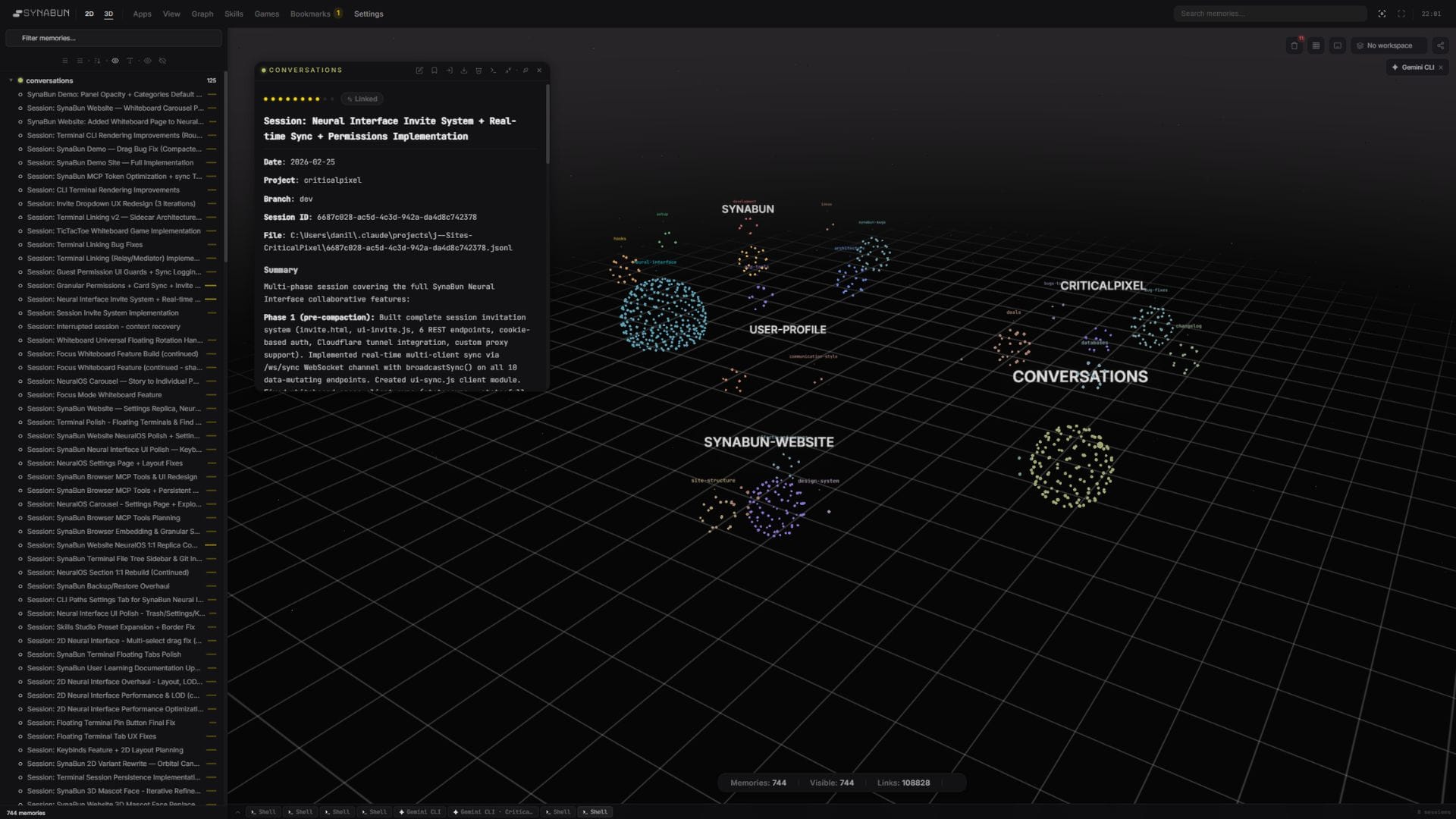
Memories are not a black box. Explore them in a living 3D space, organize them, shape them, and watch connections form on their own. A knowledge base you can see, touch, and understand.

Features Powerful by default Zero configuration

Session Start

Close your laptop. Open it tomorrow. Your AI already knows what you were building, what broke, and what's next. No "where were we?" ever again.

Save Anything

Tell your AI to remember a decision, a fix, an API quirk. It stores the full context with tags, importance, and file links. Not a bookmark — a memory.

Instant Recall

Forgot how you solved something three weeks ago? Describe it in your own words. SynaBun searches by meaning, not keywords — so "that auth thing" actually works.

Cross-AI Memory

Used Gemini for research? GPT for a brainstorm? Tell Claude what you found, it saves the knowledge. Switch models, switch providers — your context travels with you.

Update & Evolve

Decisions change. Code evolves. Update any memory in place — new content, new tags, bumped importance. Your knowledge base stays current, not fossilized.

Drift Detection

Refactored a file? SynaBun compares file checksums against stored memories and flags anything stale. Your AI never gives advice based on code that no longer exists.

Auto-Organized

Bug fixes go to bug fixes. Architecture calls go to architecture. Your AI reads category routing rules and sorts every memory on its own. One question pulls them all back.

Autonomous Loop

Give your AI a repeating task and walk away. It runs up to 50 iterations — fixing lint errors, migrating files, updating imports. You come back to a changelog.

Browser Control

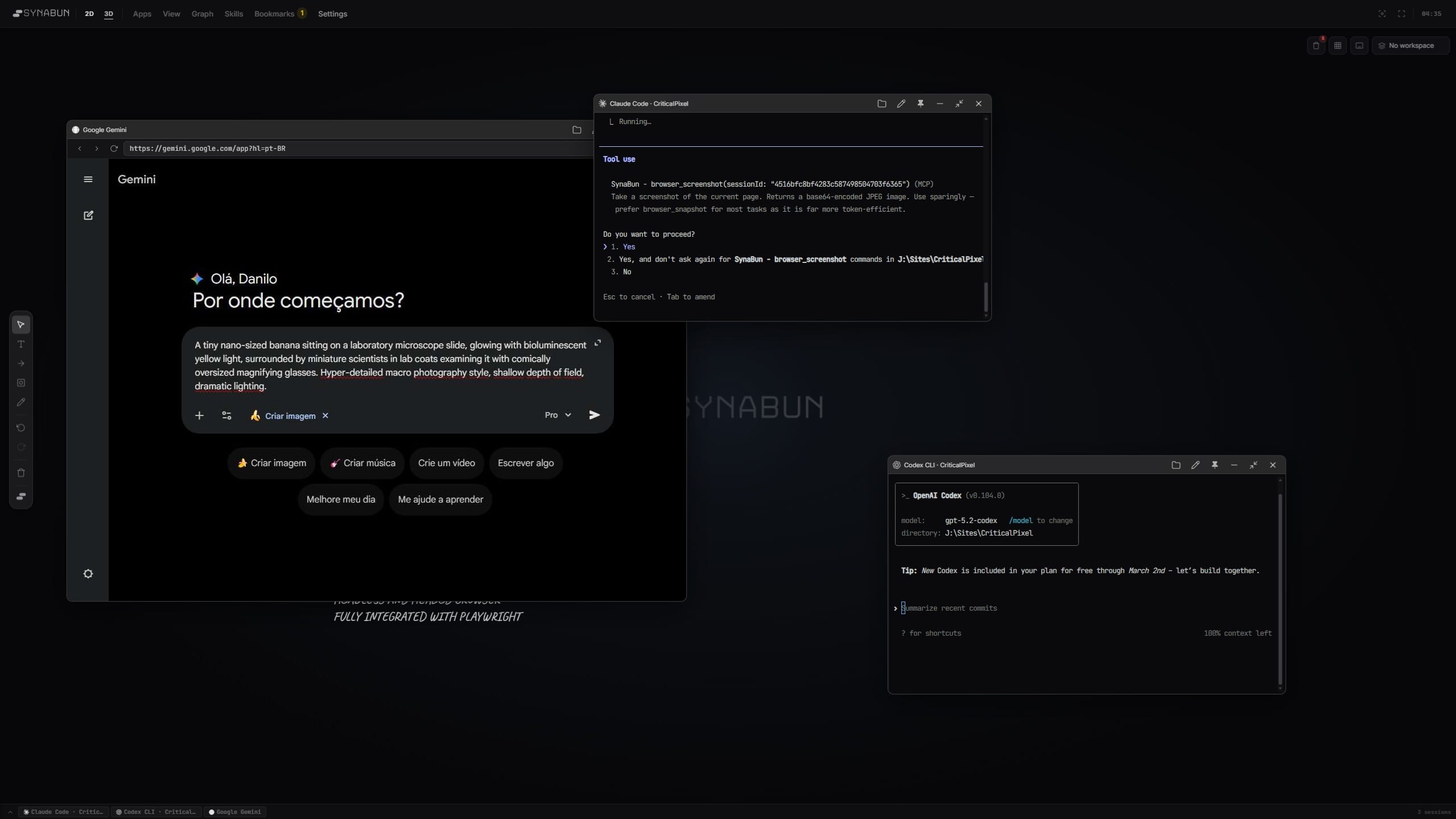
A fully headed Chrome browser your AI controls directly. Opens pages, clicks buttons, fills forms, takes screenshots — with persistent sessions and cookies that survive across conversations.

Visual Whiteboard

Ask your AI to diagram an architecture, sketch a data flow, or map out a migration plan on the Neural Interface whiteboard. Visual thinking, on demand.

/synabun

One slash command, four tools. Brainstorm from your past work, audit stale memories, run a system health check, or deep-search everything you've ever saved.

Pattern Learning

Week one, it helps. Month three, it thinks like you. Accumulated memories teach your AI your conventions, your naming style, your go-to patterns. It stops guessing.

Ask your AI anything

Technology Built on giants

Open protocols, best-in-class vector storage, and state-of-the-art neural embeddings. No vendor lock-in, no compromises.

MCP

Model Context Protocol

The open standard that lets AI talk to any tool. It's how SynaBun plugs into Claude and other assistants without locking you into one provider.

SQLite

Embedded Database

Where your memories actually live. SQLite is a lightweight, zero-config embedded database that stores vectors and metadata locally — no server process, no Docker, no network overhead. Just a single file on disk.

Playwright

Browser Automation

Give your AI its own fully headed Chrome browser. Not a headless scraper, a real browser it can see and control. Navigate, click, fill forms, screenshot, extract data, automate social media. Sessions and cookies persist across conversations. 38 Playwright-powered tools for true internet access.

Node.js

JavaScript Runtime

The engine running under the hood. Node.js is trusted by millions of apps worldwide and keeps SynaBun fast, reliable, and easy to extend.

Transformers.js

Local Embeddings

Neural embeddings that run entirely in Node.js. The all-MiniLM-L6-v2 ONNX model downloads once (~23MB) and generates 384-dimensional vectors locally — no API keys, no network calls, no cost.

Three.js

3D Visualization

See your memories as a living 3D map you can spin, zoom, and explore. Connections between ideas appear naturally so you can understand how your knowledge fits together.

SynaBun MCP Bundle 67 tools

Memory, browser automation, visual workspace, and autonomous loops. One MCP connection. Install once, unlock everything.

SynApp Your AI workspace, visualized
NeuralOS
3D memory graph, floating cards, 2D workspace, and multi-model terminal in one interface.
Empty NeuralOS workspace — blank canvas with SynaBun logo
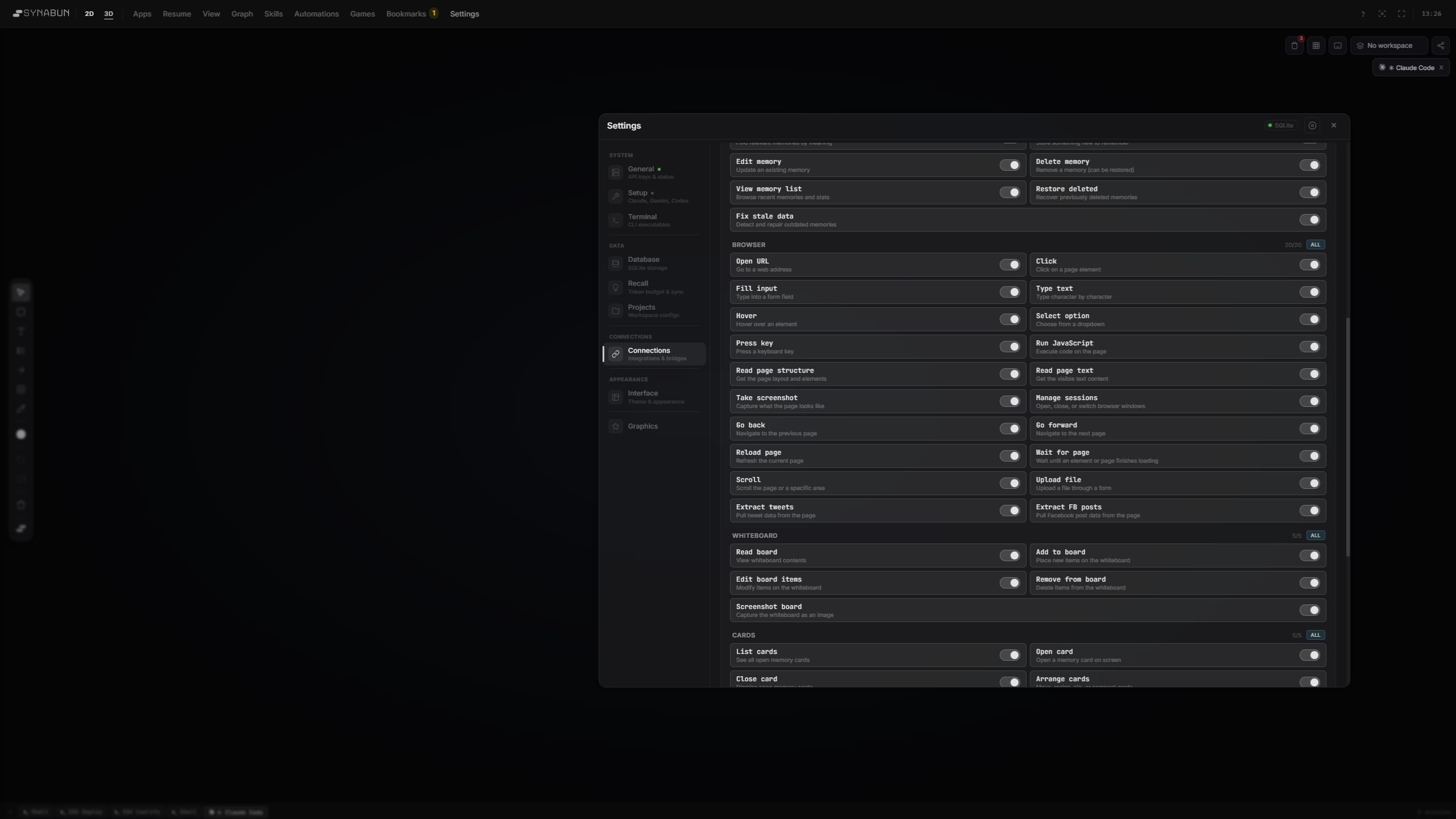
SynApp Settings — granular toggle controls for every tool, read instantly by Claude
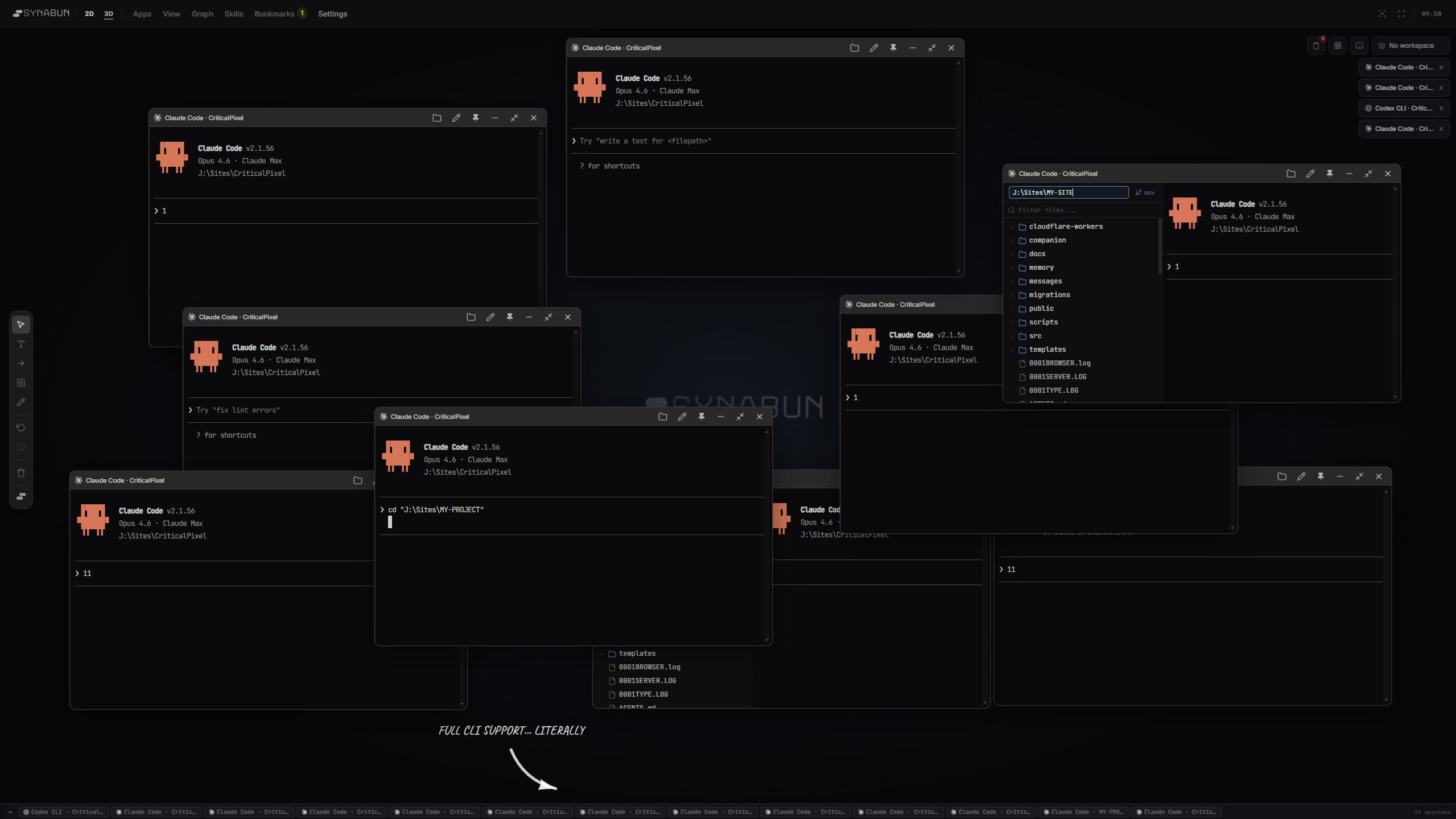
Claude Code terminal docked in NeuralOS workspace
NeuralOS workspace with browser, memory explorer, and floating cards
Full NeuralOS interface — 654 memories, 75,412 links, everything connected
Select a memory to view details
Files
SQLite: Connected
Local model — no API key required
Default: data/memory.db
Key is set — leave empty to keep current
System Backup & Restore
Create a full backup of all data including config, categories, and collection snapshots.
Greeting On
Variable Reference
{time_greeting} — Good morning / afternoon / evening
{project_label} — Project display name
{branch} — Current git branch
{date} — Today's date
⋮⋮
⋮⋮
Hooks 4/5
SessionStart
Runs once when a new session begins
UserPromptSubmit
Runs on every user message
PreCompact
Caches session data before context compaction
Stop
Enforces session indexing after compaction
PostToolUse
Tracks edits and clears enforcement flags
Features
Conversation Memory
Auto-index sessions on compaction for cross-session recall
User Learning
Observe communication patterns, preferences, and behavioral singularity
Reflect every
interactions
External Access
Tunnel
Ready — expose MCP via public tunnel
API Key
No key — open access
Web UI → Connectors → Add MCP server
Bridges Off
OpenClaw
Read-only overlay of OpenClaw markdown memories
Skills 3
/deploy
Run deployment pipeline
/test
Execute test suite with coverage
/lint
Run linter and auto-fix
CLI Executable Paths
Configure the command used to launch each CLI from the terminal. Use a bare name for PATH lookup, or a full path for custom installs.
default
default
default
Examples
claude — Default, uses system PATH
/opt/homebrew/bin/claude — Custom Unix path
C:\Users\me\.npm\claude — Custom Windows path
wsl claude — Run via WSL on Windows
wsl -d Ubuntu gemini — Specific WSL distro
Claude Connected
MCP Server
Registered in ~/.claude.json
Copy CLI Command
## Persistent Memory System\n\nClaude has persistent vector memory via the MCP server.\nSQLite database: `data/memory.db` | Embeddings: Transformers.js (local)\n\n### Memory Tools\n| Tool | Purpose |\n|------|---------|...
Copy Ruleset
Paste into your project's CLAUDE.md
Gemini Off
MCP Server
Not connected
{\n "mcpServers": {\n "memory": {\n "command": "npx",\n "args": ["-y", "memory-mcp"]\n }\n }\n}
Copy JSON Config
## Memory System\n\nYou have persistent memory via MCP tools.\n\n### Auto-Recall\n- At session start: recall context...
Copy Ruleset
Paste into your project's GEMINI.md
Codex Off
MCP Server
Not connected
Copy CLI Command
[mcp_servers.memory]\ncommand = "npx"\nargs = ["-y", "memory-mcp"]
Copy TOML Config
## Memory System\n\nPersistent vector memory via MCP.\n\n### Tools\nremember, recall, reflect, forget, memories...
Copy Ruleset
Paste into your project's AGENTS.md
Browser Playwright
× DPR
60%
Profile & Storage
Pro tip: Create a dedicated Chrome profile. Paste the path from chrome://version → "Profile Path". Use the parent folder.
Save cookies & localStorage between sessions
Identity & Stealth
webdriver=false, fake plugins, language cloning
Display & Emulation
×
Mobile Touch
Advanced
Timeouts & Launch
action nav slow
Screencast
× everyframe
Security
JS
Skip HTTPS
Bypass CSP
Downloads
Strict
Geolocation
Permissions
Network & Proxy
Recording
×
Memory Collections
default-memories
data/memory.db
847 pts
shared-team
data/team.db
234 pts
cloud-backup
data/backup.db
Per-project hook installations. Each project gets its own settings entry.
my-saas-app Active
Path
~/Projects/my-saas-app
open-source-lib Active
Path
~/Projects/open-source-lib
Recall Token Budget
Control how much of each memory is injected into the AI context window. Lower values save tokens and reduce cost per recall.
Brief~40 tokens per memory
Summary~130 tokens per memory
FullNo truncation
Limit No limit
When to use each level
Brief Routine coding — quick lookups, bug fixes, simple tasks
Summary General development — feature work, refactoring, reviews
Full Planning & brainstorming — architecture decisions, deep context
Memory Sync
Scan for memories whose related files have changed since they were last stored. Stale memories may contain outdated information.
DefaultStandard glass look
FrostedHigh blur, soft edges
SolidOpaque, minimal blur
MinimalNear-invisible panels
Scale %
Glass & Transparency
Panel Opacity 0.72
Backdrop Blur 40
Saturation 1.4
Border Glow 0.06
Shadows
Intensity 0.40
Spread 20
Shape & Type
Corner Radius 14
Font Scale 1.00
Accent Color
hsl(0, 0%, 80%)
Hue 0
Saturation 0%
Lightness 80%
Graph visualization
Press V to toggle Focus Mode. Pauses GPU rendering and shows a calm background.
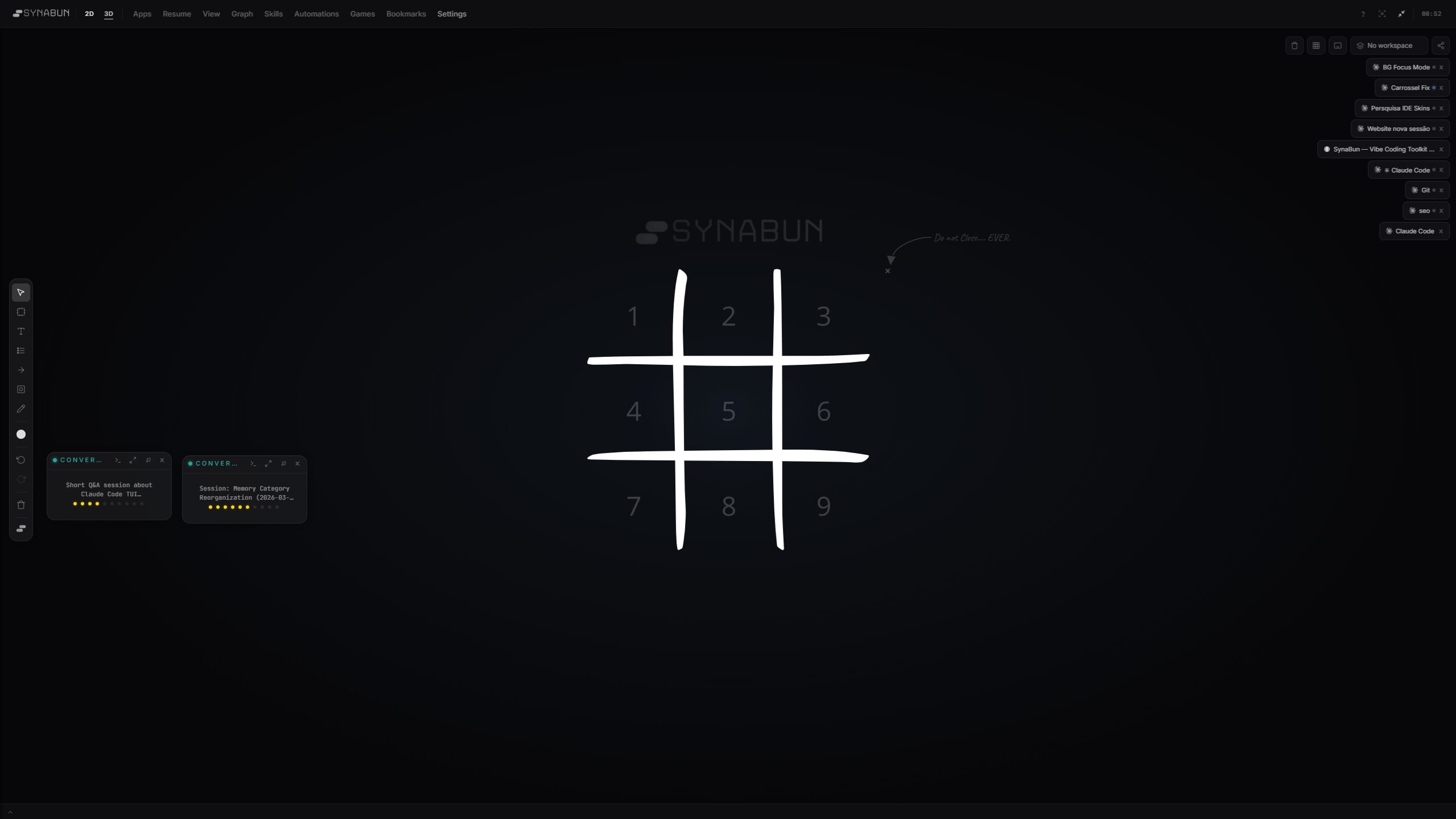
Whiteboard — Claude vs Gemini Tic Tac Toe via MCP
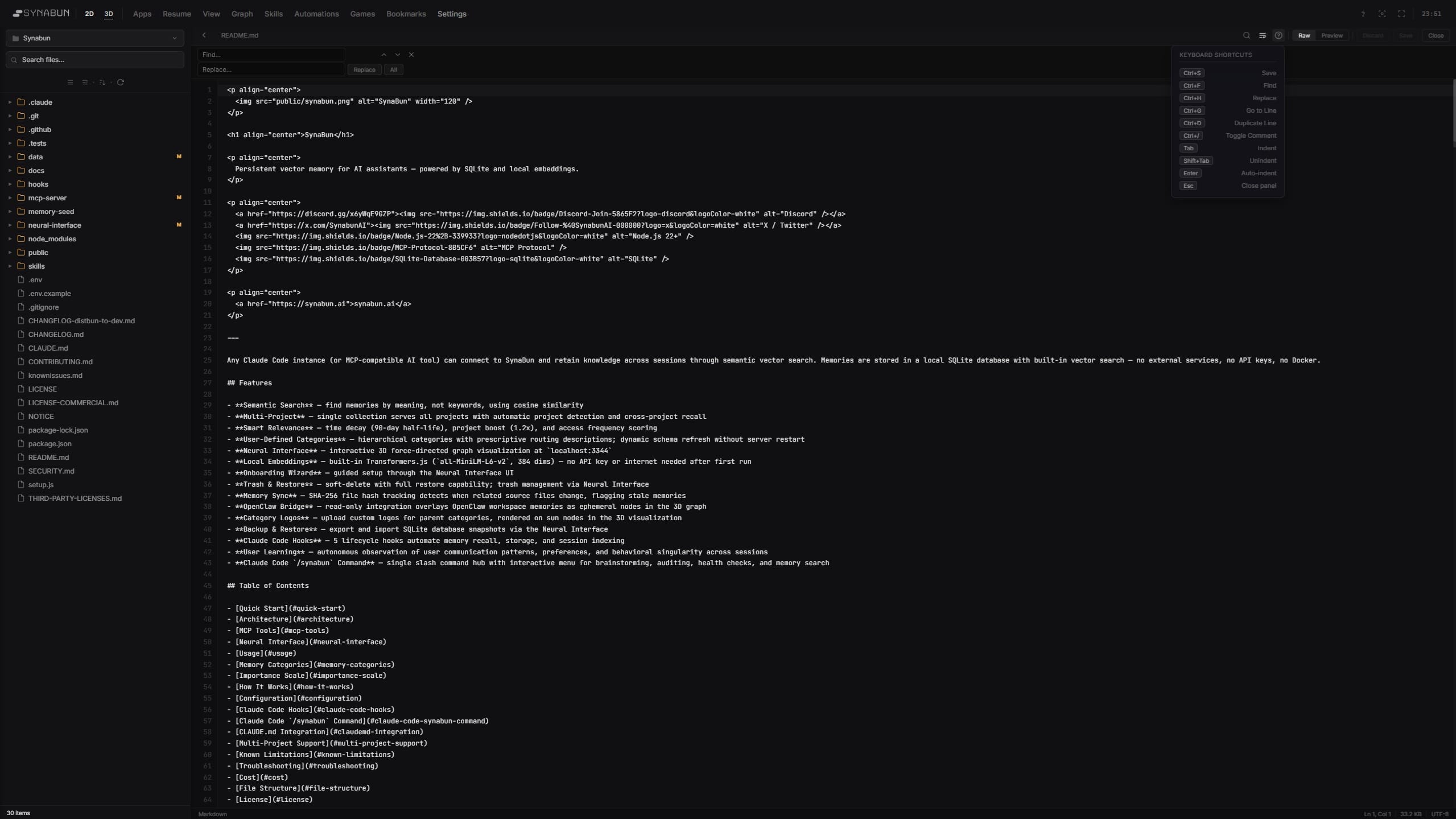
Code Editor — file explorer, syntax highlighting, find & replace inside Neural Interface

your AI's Playground

Ask Claude to pin a memory and it appears here — architecture decisions, bug investigations, research notes, all summoned to a shared canvas you can drag, rearrange, and explore.

Drag memories to rearrange the board
Drop cards into the terminal to run
Edit and annotate directly on canvas
Draw arrows to link related ideas
Sketch diagrams on the whiteboard
Browse the web without leaving
File tree, git, and full shell access
Your AI controls it all via MCP
dad and mom
WHOA,WHOA,SUCH MARKDOWNS!SUCH MARKDOWNS!
Yep, all MCP.
Architecture
Chose Next.js 15 App Router

App Router for native RSC support, streaming SSR, and nested layouts. Trade-off: steeper curve, some libs not RSC-ready.

Tags
nextjs react ssr
Metadata
Projectnova-saas
Bug Fixes
Fixed race condition in concurrent API calls

Bug: Two simultaneous task updates could cause stale data. Optimistic cache update + server response arriving out of order.

Fix: Added a version counter to each entity. Mutation includes expected version, server rejects stale writes with 409 Conflict. Client retries with fresh data.

Verified fix under load — 500 concurrent writes, zero data loss. P99 latency unchanged at 42ms.

Tags
race-condition concurrency optimistic-locking api
Related Files
src/lib/api/mutations.ts
src/lib/cache/optimistic.ts
Metadata
Projectnova-saas
Research
Evaluated vector databases

Compared SQLite, Pinecone, and Weaviate. Winner: SQLite — zero-config, file-based, built into Node.js 22.5+, no external process needed.

Tags
vector-db sqlite pinecone
Metadata
Projectnova-saas

Connects Every model, one memory

One MCP server syncs across every AI surface simultaneously. Switch tools mid-thought, your context is already there.

Claude
Code · AI · App · Cowork
Works with Claude Code, Claude.ai, the Claude.ai Android app, and Cowork out of the box. On mobile, use your own hosting or the included Claudeflare proxy with a self-generated access key.
Zero config Remembers your projects Instant search
You: How did I fix the login bug?
 
Claude: You fixed it 2 weeks ago.
  The redirect URL was wrong.
  You changed it in auth.ts
Gemini
Google AI Studio
Switch to Gemini and your memories come with you. Ask about past work, get real answers from things you actually did. No copy-pasting context between tools.
Shared memory Works in AI Studio Real-time sync
You: What was our deploy setup?
 
Gemini: Found it in your memory.
  Docker Compose with auto-rollback.
  Saved 3 weeks ago
OpenAI
ChatGPT · Codex
Ask ChatGPT about past work and it actually knows. Codex agents can look up your decisions while coding on their own. Same memory, different tools.
Works in ChatGPT Works in Codex Same memory
You: What was that cache fix?
 
ChatGPT: You switched to Redis
  with a 5 minute refresh.
  Saved 12 days ago
OpenClaw
See all your agents
Everything your AI agents know shows up in one place. Browse their logs, configs, and knowledge visually. Always in sync, never lost.
Visual overview Agent logs Always in sync
Synced · all agents
 
  42 memories indexed
  12 days of activity
  3 agents connected
Self-Host
Your server, your rules
Runs on your machine. No accounts, no cloud required. One command and you're up.
MCP
Any MCP Client
Open standard
Built on an open standard. Any AI tool that supports MCP works automatically.

Install One command, you're ready

Install SynaBun, run the onboarding wizard, and your AI starts remembering. SQLite and local embeddings are built in — the wizard handles the rest.

Guided 7-step wizard at localhost:3344
Auto-configures SQLite, embeddings, and MCP
67 MCP tools ready in Claude Code
$ git clone github.com/danilokhury/Synabun.git
$ cd synabun
$ npm start

100% free, 100% local (99% if you don't self-host your embedding key)